



Online Payment Systems: Stripe, PayPal & Strategic Choices
Choosing how to accept money online is one of the most critical decisions for any modern business. Your payment system is the final, essential step in your sales funnel. A poor choice can mean losing customers at the last second. A smart choice can improve cash flow, reduce fraud, and even become a source of partnership revenue.
We explain the mechanics, the players, and the strategic considerations, moving from basic setup to expert-level planning.
The Anatomy of an Online Transaction: Every online payment involves four key components. Understanding them clarifies what you're actually paying for.
- Payment Method: The customer's chosen instrument (credit card, digital wallet like Apple Pay, bank transfer).
- Payment Gateway: The secure software on your website that collects and encrypts the payment details.
- Payment Processor: The company that communicates with banks to authorize the transaction and move funds.
- Merchant Account: A special type of bank account that holds business transaction funds before they settle into your main account.
Most modern businesses use services that bundle these components, simplifying setup and management.
There's More To It Than Just a Checkout Button
Your payment system is an operational infrastructure. It directly impacts three key areas:
- Customer Trust and Conversion: A seamless, familiar, and secure checkout experience makes customers feel confident. Clunky, slow, or unfamiliar payment pages cause abandonment.
- Business Operations: The right system automates billing, manages subscriptions, prevents fraud, and provides clear financial reporting. The wrong system creates manual work and blind spots.
- Financial Health: Transaction fees, payout speed, and the risk of holds or chargebacks affect your cash flow and profitability.
The most significant initial decision is between a bundled solution (one provider for everything) and a modular setup (different providers for the gateway, processor, and merchant account). For 95% of businesses today, a bundled solution offers the best balance of simplicity, cost, and capability.
The 7 Essential Categories of Payment Solutions
Every business fits into one or more of these categories. Your primary business model will determine which category is your foundational "home base." Think of this as choosing your payment operating system.
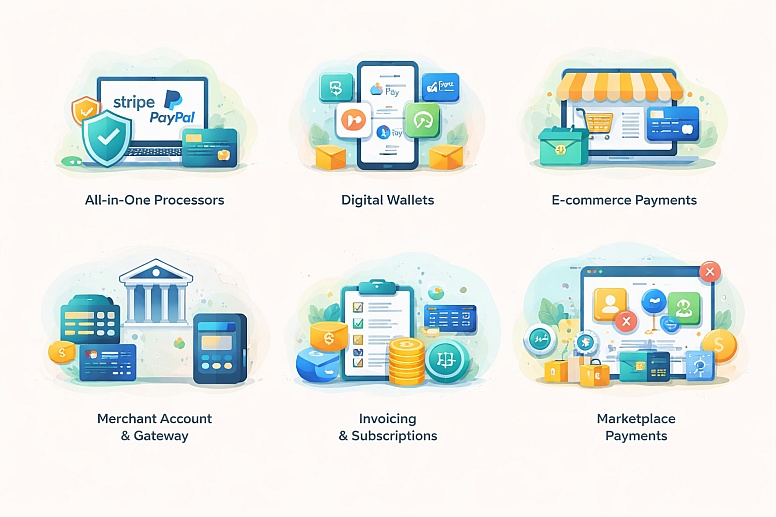
1. All-in-One Payment Processors (The Universal Toolkit)
These platforms bundle the gateway, processor, and merchant account into a single, unified service.
- How They Work: You integrate their code into your website or app. They manage the entire payment flow, from card entry to bank deposit, all within their ecosystem. Examples: Stripe, PayPal Commerce Platform, Square Online.
- Best For: The vast majority of online businesses—SaaS companies, direct-to-consumer brands, startups, and custom-built websites. They offer a balance of ease-of-use for simple needs and deep APIs for complex customization.
- Inside View on Stripe: Stripe is engineered as a developer-first platform. Its core advantage is a meticulously designed API that allows businesses to build unique payment flows, subscription logic, and financial operations that feel native to their product. It’s a foundational layer, not just a plugin.
- Common Oversight: Treating these providers as mere commodities. Stripe's strength is customizability and scalability for tech-forward businesses. PayPal's strength is instant consumer recognition and trust, which can boost conversion.
2. Digital Wallets & Express Checkouts (The Conversion Boosters)
These are not full processors but accelerated payment methods you layer on top of your primary system.
- How They Work: Customers pay using saved credentials from an existing account (e.g., their PayPal balance, Apple ID, Google account). This often requires just one or two clicks. Examples: PayPal Express Checkout, Apple Pay, Google Pay.
- Best For: Any business selling directly to consumers where checkout speed and reducing typing friction directly increase sales. Critical for mobile commerce.
- Integration Path: You activate these through your primary payment processor’s dashboard. Enabling Apple Pay in your Stripe settings is a standard configuration, not a separate partnership.
- Actionable Insight: If your analytics show significant mobile traffic, not implementing digital wallets is leaving money on the table. They can reduce checkout time by over 70%.
3. Native E-commerce Platform Payments (The Integrated Engine)
If you build your store on a dedicated platform like Shopify, BigCommerce, or WooCommerce, they provide a deeply embedded payment solution.
- How They Work: You activate payments within your store admin. The platform handles all backend integration, and transactions appear alongside orders in a unified dashboard. Examples: Shopify Payments (powered by Stripe), BigCommerce Payments.
- Best For: Businesses fully committed to a specific e-commerce platform that prioritize operational simplicity and unified reporting.
- Key Benefit: Cohesion. Dispute management, analytics, and order fulfillment connect directly to the payment data.
- Vendor Lock-in Consideration: Platforms often apply an additional fee (typically 0.5%-2.0%) if you choose not to use their native payment system, incentivizing you to stay within their walled garden.
4. Traditional Merchant Account + Gateway (The Modular System)
This is the legacy model: a merchant account from a bank paired with a separate, standalone payment gateway.
- How They Work: You undergo an underwriting process to secure a merchant account from a bank or ISO. You then contract with a separate gateway company (e.g., Authorize.net) to connect your website to that account.
- Best For: Large, established businesses with extremely high, predictable transaction volumes where negotiating custom, interchange-plus pricing can yield significant savings.
- The Trade-off: Complexity. You manage multiple contracts, multiple fee lines, and a more fragile technical integration. Setup takes weeks, not minutes.
5. Invoicing & Subscription Billing Engines (The Revenue Operations Hubs)
These specialized tools focus on the "request for payment" and managing recurring revenue relationships.
- How They Work: You generate and send digital invoices or configure complex subscription plans (e.g., seats, usage meters). The system automates delivery, follow-ups, and recurring charges. Examples: Stripe Billing, Chargebee, Recurly.
- Best For: B2B companies, freelancers, agencies, and any subscription-based business (SaaS, memberships, newsletters).
- Critical Function – Dunning Management: This is the automated process of retrying failed payments with intelligent timing and communication. A sophisticated dunning system can recover 15-30% of failed subscription payments that a basic system would lose.
- Common Pitfall: Using a simple payment link for subscriptions. This fails to address plan upgrades, prorations, and failed payment recovery, creating massive administrative overhead and revenue leakage.
6. Marketplace & Platform Payment Systems (The Multi-Party Infrastructure)
Specialized infrastructure for businesses that facilitates transactions between multiple parties, taking a commission.
- How They Work: These systems allow you to onboard third-party sellers or service providers ("Connected Accounts"). They handle split payments, compliance verification (KYC), and scheduled payouts to all parties. The dominant example: Stripe Connect.
Whop is another marketplace payments provider that allows you to create connected accounts for pay-ins and pay-outs. - Best For: Marketplaces (e.g., Etsy-style, service platforms), crowdfunding sites, or any platform where money changes hands between users.
- Non-Negotiable Requirement: You must use a dedicated platform tool. Attempting to manually manage funds between standard accounts violates terms of service, creates severe legal and tax liability, and is an operational impossibility at scale.
7. Regional & Local Payment Methods (The Global Gateway)
To win in international markets, you must accept the payment methods that are default in those regions.
- How They Work: You integrate specific, local payment options for target countries. Examples: iDEAL (Netherlands), Bancontact (Belgium), Alipay (China), Boleto (Brazil).
- Best For: Businesses with a deliberate, focused strategy to sell in specific overseas markets.
- Access Point: Global processors like Stripe and Adyen have built extensive libraries of these methods. For niche regional coverage, you may need a local acquirer.
- Conversion Impact: Offering a familiar, local payment method can increase approval rates and conversion by 50-100% compared to presenting only international credit cards.
The Mechanics Behind the Scenes
Understanding these underlying mechanisms will help you diagnose problems and evaluate providers.
Hosted vs. Integrated Checkout – The UX Divide
- Hosted Checkout: The customer is redirected to the payment provider's domain (e.g.,
paypal.com) to complete the transaction. Pros: Fast to implement, shifts PCI compliance burden. Cons: Breaks user experience, often looks generic, can increase abandonment. - Integrated Checkout (via API): The payment form is served directly on your website using the provider's secure elements (e.g., Stripe Elements). Pros: Seamless, branded user experience you fully control. Cons: Requires more development resources and ongoing maintenance.
Security: PCI Compliance and Tokenization: The Payment Card Industry Data Security Standard (PCI DSS) is a complex set of security requirements. If card data touches your server, achieving compliance is expensive and arduous.
Tokenization is the modern solution. When a customer enters a card, the data goes directly from their browser to the processor's vault. Your system receives only a unique "token" (e.g.,tok_1Mq6L2LkdIwHu7ix) that you can safely store and use for future charges. This means you never handle sensitive data, dramatically reducing your compliance scope.
To protect sensitive customer data during online transactions, it’s also wise to use a secure connection. A VPN encrypts traffic between your device and the payment system, reducing exposure to interception or unauthorized access. While a VPN doesn’t replace PCI compliance or proper tokenization, it adds a privacy layer that’s especially useful when managing payments on public or shared networks.
Understanding Pricing Models
- Flat-Rate Pricing: A single, blended percentage + fixed fee per transaction (e.g., 2.9% + $0.30). Used by most bundled providers. Simple and predictable.
- Interchange-Plus Pricing: You pay the actual, variable interchange fee set by the card network (Visa, Mastercard) plus a fixed processor markup. Interchange fees vary by card type (debit, corporate, rewards). This model can be cheaper at very high volumes, but is far more complex to analyze.
The Funds Flow: Authorization, Settlement, Payout
- Authorization: The customer's bank approves the charge and places a hold on the funds. This is instantaneous.
- Settlement: Typically, once per day, your processor batches the authorized charges and formally requests the funds from the card networks.
- Payout: The settled funds, minus fees, are deposited into your connected bank account. This usually takes an additional 1-3 business days after settlement. Some processors offer "Instant Payouts" to a debit card for a small fee (e.g., 1%).
Use-Case Analysis: Matching the Tool to the Task
Use Case 1: The Professional Services Firm (Agencies, Consultants, Lawyers)
- Specific Constraints: Needs to bill clients formally, often with net-30 terms. May charge retainers or milestone payments. Low to medium transaction volume, but high average transaction value.
- Tool Category Fit: Invoicing & Billing Engines. A tool like Stripe Invoicing allows for detailed, professional invoices with line items, tax calculation, and automatic payment reminders.
- Common Mistakes: Relying on PDF invoices and manual bank transfer tracking. This creates accounting chaos and delays payment.
- Selection Advice: Prioritize systems that integrate directly with your accounting software (e.g., QuickBooks, Xero) and allow for partial payments or payment plans on large invoices.
Use Case 2: The Digital Product Creator (Online Courses, Software, Ebooks)
- Specific Constraints: Requires instant, secure access delivery upon payment. High risk of "friendly fraud" (chargebacks after download). Often uses promotional pricing and coupons.
- Tool Category Fit: An All-in-One Processor linked to a dedicated delivery platform (e.g., using Stripe with Podia or Teachable), or using the processor's API to trigger automated delivery.
- Common Mistakes: Emailing download links manually, which doesn't scale and provides no fraud protection. Using a system with weak dispute evidence collection.
- Selection Advice: Choose a system that provides robust evidence for digital delivery (IP address, access timestamps) and allows you to easily issue refunds as an alternative to fighting chargebacks.
Use Case 3: The Omnichannel Retailer (Online + Physical)
- Specific Constraints: Needs to unify inventory and payment reporting across online and in-person sales. May offer buy-online-pickup-in-store (BOPIS). Must handle returns seamlessly across channels.
- Tool Category Fit: A unified commerce platform like Square or a combined Stripe (online) + POS system integration. The key is a single dashboard for all transactions.
- Common Mistakes: Using completely separate, unconnected systems for online and in-store. This fractures customer data and creates inventory and reporting nightmares.
- Selection Advice: Evaluate the offline POS capabilities of your chosen online processor, or vice-versa. Ensure the system can track a customer across channels and handle linked refunds.
Use Case 4: The Nonprofit or Donation-Based Organization
- Specific Constraints: Needs to offer one-time and recurring donations. Requires a clear designation of funds to campaigns. Transaction fees are a major concern, as donors prefer 100% of the gift to go to the cause.
- Tool Category Fit: All-in-One Processors with nonprofit-specific features or platforms like Donorbox or GiveButter Neon CRM alternatives that sit on top of processors. Look for "fee coverage" or "tip coverage" features.
- Common Mistakes: Using a standard business account and not applying for nonprofit discounted rates. Not offering a "cover the fees" option to donors.
- Selection Advice: Apply for the nonprofit discount programs offered by Stripe and PayPal (often ~2.2% + $0.30). Prioritize platforms that make recurring donor management and campaign tracking easy.
Use Case 5: The High-Risk Business (CBD, Vaping, Travel, Tech Support)
- Specific Constraints: Explicitly prohibited or heavily scrutinized by most mainstream processors. Requires a "high-risk" merchant account. Expect higher fees, rolling reserves (where a % of revenue is held for 90-180 days), and stricter contracts.
- Tool Category Fit: A specialized High-Risk Merchant Account Provider paired with a compatible gateway. This is a niche, expert market.
- Common Mistakes: Misrepresenting your business to a standard processor to get an account. This will lead to immediate termination and funds being held for months.
- Selection Advice: Be completely transparent with providers. Work with an industry-specific payment facilitator. Budget for higher costs (fees of 4-6%+ are common) and cash flow impact from reserves.
Comparative Evaluation: A Decision Matrix
Use this table to narrow your options based on primary business drivers.
| Evaluation Criteria | All-in-One Processors (Stripe, PayPal) | E-commerce Platform Payments (Shopify) | Traditional Merchant Account | Invoicing/Billing Specialists (Chargebee) |
|---|---|---|---|---|
| Speed of Setup | Fast (minutes to hours for basic integration). | Fastest (toggle switch in admin). | Very Slow (weeks for underwriting). | Moderate (requires plan and product configuration). |
| Development Control | Maximum Control via APIs for custom flows. | Limited Control over the platform's allowed features. | Moderate Control via gateway APIs. | High Control over billing logic, limited control over checkout UI. |
| Recurring Billing Strength | Strong (core feature for Stripe/Braintree). | Adequate for simple plans. | Variable (depends on gateway). | Exceptional (their sole focus). |
| International Capability | Excellent (many local methods, local acquisition). | Good (varies by platform). | Poor (requires separate global gateways). | Good (built on underlying processors like Stripe). |
| Ideal Business Volume | Startup to Enterprise. | SMB to Mid-Market. | Mid-Market to Enterprise. | SMB to Mid-Market (for pure billing). |
Expert-Level Considerations and Strategic Partnerships
Once your basic payment flow is operational, these advanced factors create efficiency, reduce cost, and open new opportunities.
Payment Optimization and Cost Management
- Network Tokenization: Beyond basic tokenization, "network tokens" are issued by card networks (Visa, Mastercard). They increase authorization rates and can reduce fraud, potentially lowering your effective costs. Ask if your processor uses them.
- Intelligent Payment Routing: For large enterprises, this means routing transactions through different acquirers or pathways based on card type, currency, or country to achieve the highest approval rate or lowest cost. This requires significant technical investment.
The Strategic Partnership Angle: Affiliate and Integration Revenue: This is a frequently overlooked area. If you achieve significant scale or operate in a specific niche, your choice of payment system can generate partnership revenue. You become a referral source.
- How it Works: Most major payment providers (Stripe, PayPal, Square) have official partner or referral programs. If you recommend their service to another business (e.g., a client, a vendor in your industry) and they sign up, you can earn a recurring revenue share on their processing fees for 12+ months.
- The Professional Service Angle: As an agency, developer, or consultant, you can build deep expertise in implementing a specific platform like Stripe. You can then offer certified integration services. The payment provider often maintains a partner directory where businesses search for experts, sending you qualified leads.
- Actionable Step: If you have a platform with many business users (e.g., software for restaurants), you can embed a payment solution like Stripe Connect and earn revenue from the payment activity you facilitate. This transforms a cost center into a revenue line.
To explore formal partnership opportunities, you would directly engage with the business development or partnerships team of the payment provider you've standardized on. A well-integrated, high-volume account is the best entry point for that conversation.
Data as an Asset: Your payment data isn't just a record of sales. Analyzed properly, it can forecast cash flow, identify your most valuable customer segments, and detect early warning signs of fraud. Use your processor's reporting API to pull data into your internal dashboards. Look for trends in decline reasons, chargeback rates by product, and the cost of different payment methods.
Failure Modes & Misconceptions
Misconception 1: "Switching processors is easy, so I'll just start with the cheapest." Migration is often complex. You must rebuild integrations, re-issue saved customer payment tokens (which can cause subscriber churn), and manage parallel reporting during transition. The initial choice has more inertia than it seems.
Misconception 2: "PCI compliance is my processor's problem." While a hosted checkout or proper tokenization minimizes your scope, you are never fully absolved. You are responsible for ensuring your website and internal systems don't inadvertently expose card data. Annual self-assessment questionnaires (SAQs) are still required for most businesses.
What Actually Goes Wrong:
- The "Sudden Risk Review" Freeze: Your sales spike after a viral moment. The processor's automated system flags this as potential fraud and holds all funds for 30-90 days for review, crippling your cash flow right when you need it most. Proactive communication with your provider during growth phases can mitigate this.
- The Silent Subscription Killer: A minor change to your website (a new SSL certificate, a CDN update) breaks the JavaScript loading your payment forms. New customers can't subscribe, but existing recurring charges continue. You might not notice for days, losing new revenue without an obvious outage. Monitoring for a drop in new transaction volume is critical.
- The International Expansion Tax Surprise: You successfully start selling in the EU without realizing you've crossed the VAT registration threshold. You are now liable for collecting, reporting, and remitting VAT, with penalties for past months. Payment providers like Stripe offer VAT calculation tools, but you must enable and configure them before you start selling.
Decision Framework: A Repeatable Selection Process
Use this sequential process to make a defensible choice.
- Define Your Dominant Transaction Type. Is it 80% one-time e-commerce? 80% recurring subscriptions? 80% invoiced B2B? This single answer points to your primary category from the list of seven.
- Audit Your Technical Debt and Resources. List your team's skills. Do you have in-house developers comfortable with APIs? Are you on a no-code platform? Your answer determines if you can pursue an integrated path or need a hosted/turnkey solution.
- Map Your Geographic Footprint Today and in 18 Months. List your current and target customer countries. Cross-reference this with the local payment methods table from a provider's documentation. Eliminate options that don't support your next key market.
- Model the Total Cost of Ownership (TCO). For your last 100 transactions, calculate what they would have cost under the short-listed pricing plans. Include monthly fees, estimated chargeback costs, and the value of your team's time managing the system. The cheapest per-transaction fee often loses this analysis.
- Conduct a Security and Compliance Review. For the final contenders, read their PCI DSS Responsibility documentation. Understand exactly what security tasks fall on your team. Speak to their support with a specific, technical pre-sales question and gauge responsiveness.
- Plan the Implementation and Migration. For the chosen provider, document every step: creating the account, updating website code, testing in sandbox, going live, migrating existing customer data, and communicating the change to customers. A clear plan reveals hidden complexities.
Final Pre-Launch Verification Checklist:
- [ ] The signed agreement matches the advertised pricing plan you expect.
- [ ] Payout timing and schedule are confirmed and align with your cash flow needs.
- [ ] You have successfully processed a live transaction in test mode and received the funds in your bank account.
- [ ] Webhooks (for payment success/failure notifications) are configured and tested.
- [ ] Basic fraud filters (AVS, CVC) are enabled at conservative settings.
- [ ] A team member is assigned to review the payment dashboard weekly for anomalies.
Frequently Asked Questions
Can I negotiate rates with processors like Stripe or PayPal? Yes, but typically only at very significant volume thresholds (often > $1M in annual processing volume). Before that, you are on their standard published plan. For traditional merchant accounts, negotiation is part of the initial sales process.
What's the real difference between a payment facilitator (PayFac) like Stripe and my own merchant account? A PayFac (Stripe, Square, PayPal) is the master merchant account holder. You are a "sub-merchant" under their umbrella. This allows for instant onboarding but gives the PayFac more control over your funds and account. Your own merchant account is a direct agreement with a bank, offering more stability and control, but with a slower, stricter onboarding.
How do I handle a customer's refund if the original payment method is no longer valid (e.g., the card has expired)? In most cases, the processor can still issue a refund back to the original card network. The bank will hold the funds and typically make them available to the customer via their new card or as a bank credit. You initiate the refund through your processor's dashboard as normal.
Is it legal to surcharge customers for credit card fees? Laws vary by country and state. In the U.S., surcharging is permitted at the federal level but is illegal in some states (e.g., Connecticut, Massachusetts). Visa/Mastercard rules also apply: you must disclose the surcharge clearly at checkout and on receipts, and it cannot exceed your actual processing cost (usually capped at 4%). It is often better to offer a "discount for cash/bank transfer" rather than a "credit card fee."
What happens to recurring charges if I switch processors? This is the major migration challenge. You cannot transfer saved card tokens between different processors. You must either: 1) Use a billing abstraction layer (like Chargebee) that holds the tokens and can switch processors behind the scenes, or 2) Ask your customers to re-enter their payment details, which will cause significant subscriber churn. Plan this transition meticulously.
My business is growing. When should I consider bringing payment processing in-house? Rarely. The complexity, regulatory burden, and liability of becoming a directly registered Payment Facilitator or acquiring bank are monumental (requiring tens of millions in capital and years of licensing). The strategic move is to deepen your partnership with an existing processor like Stripe, using their embedded finance tools (Connect, Issuing, Treasury) to create unique features, not to rebuild their core infrastructure.
To begin, lock down your answer to Step 1 of the Decision Framework. Your dominant transaction type is the compass for everything else.
For businesses building a platform or service that could benefit from a deeper, potentially revenue-generating integration with a payment provider like Stripe: The most effective path is to first build significant transaction volume and a stable integration using their standard tools. This demonstrates reliability and scale. Then, reach out through their official partnerships channel to discuss formalizing the relationship. Case studies and clear metrics on the business you can drive to them are the strongest foundation for that conversation.
LEAVE A COMMENT






0.2491