



Zero-Trust Security: A New Rule for Keeping Things Safe
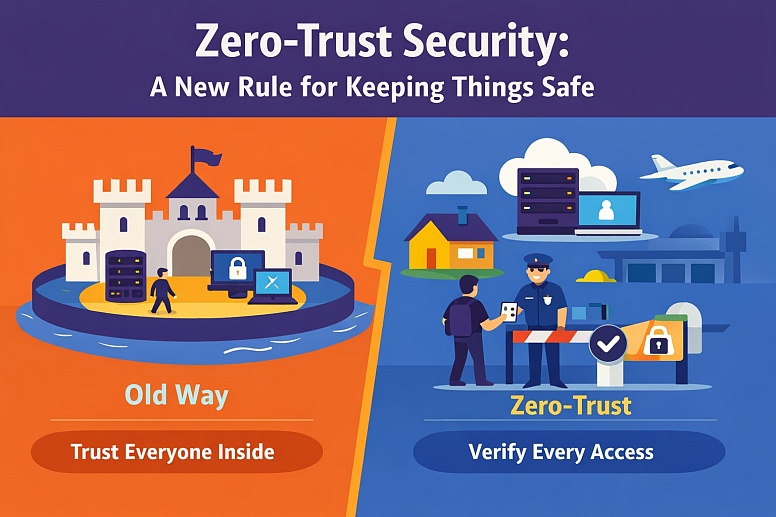
For a long time, companies kept their digital information safe by building a strong perimeter. They imagined their office network as a castle. The walls and moat kept the bad guys out. Once you were inside the castle gates, you were trusted. You could move around fairly freely to access files, printers, and servers.
This model is broken. Today, people work from home, coffee shops, and airports. Company data lives in cloud services like Google Drive or Microsoft 365, not just on a server down the hall. The castle walls are gone. The old rule of "trust anyone inside, distrust anyone outside" no longer works.
Zero trust is a different rule. The core idea is simple: never trust, always verify. You should not automatically trust anything, whether it's a person, a device, or a piece of software, just because it's connected to your corporate network. Every single request to access a resource must be checked for identity and security. It’s like having a security checkpoint at every door inside the castle, not just at the main gate.
This is not a single product you can buy. It is a way of thinking and a set of principles for building security. The goal is to stop attackers from moving easily through your systems if they get past one initial defense. It assumes a breach will happen and works to limit the damage.
The Shift in Thinking
- Old Way (Perimeter Security): Trust everyone and everything that is "inside" the company network.
- Zero-Trust Way: Trust nothing, whether it's inside or outside. Verify every access request.
- Old Way: The network location (your office IP address) determines your access.
- Zero-Trust Way: Your verified identity and the security of your device determine your access.
- Old Way: Once inside, you have broad access to many systems.
- Zero-Trust Way: You get only the minimum access you need to do your specific job, and only for that session.
The Main Parts of a Zero-Trust System
Implementing zero-trust means looking at security through a few key lenses. You build checks and controls for each one.
1. Identity: This is the new perimeter. Before anything else, you must prove who you are. For people, this usually means a username and password, but that alone is weak. Strong zero-trust requires multi-factor authentication (MFA). IAM tools can help centralize authentication and access policies, helping organizations apply these identity controls consistently across users and applications.
MFA means providing two or more pieces of evidence to log in. The most common form is something you know (a password) plus something you have (a code from an app on your phone). This makes it much harder for a hacker who steals a password to get in.
2. Devices: A verified person might be using an insecure device. You must also check the health of the device trying to connect. Is it a company-managed laptop with up-to-date software? Or is it a personal phone with an old operating system? Device checks can look for encrypted hard drives, active antivirus software, and the latest security patches. An unhealthy device can be blocked or given very limited access until it is fixed.
3. Applications and Data: This is about controlling what a verified person on a healthy device is allowed to do. The principle of least-privilege access is critical. It means a user gets only the access necessary for their role—no more. An accountant does not need access to the marketing design files. Access should also be contextual. Should an employee be able to download a customer database at 3 AM from a foreign country? Probably not. Rules can be set to block or challenge unusual requests.
4. Network: Even though the network is no longer the main boundary, it still matters. Micro-segmentation is a key technique. Instead of having one big, flat network where any device can talk to any other, you break the network into tiny, isolated segments. If an attacker infects one device in the accounting segment, micro-segmentation can prevent the infection from spreading to the research and development segment.
5. Visibility and Analytics: You cannot protect what you cannot see. A zero-trust system requires tools that log and monitor all activity across identities, devices, and applications. Analytics engines then look for unusual patterns—like a user logging in from two distant cities minutes apart, or a device suddenly trying to access hundreds of files it has never touched before. This continuous monitoring allows for real-time detection of threats.
These parts work together. A user’s request to open a file goes through a policy engine that checks: Is this the right person (Identity)? Is their device safe (Device)? Are they allowed to see this file (Data)? Is this request normal (Analytics)? Only if all checks pass is access granted.
Where Zero-Trust is Used

Zero-trust principles apply anywhere you need to protect digital assets. Here are five specific situations.
1. Securing a Remote and Hybrid Workforce
This is the most common driver for zero trust. Employees need to access tools from anywhere.
- Specific Constraints: You have no control over the employee's home network or local coffee shop Wi-Fi. Personal devices may be used for work.
- Common Mistakes: Simply giving employees a VPN (Virtual Private Network) and calling it secure. A VPN often just puts an untrusted device inside the old "trusted" network perimeter, which is exactly what zero-trust avoids.
- Practical Selection Advice: Look for a Secure Access Service Edge (SASE) or Zero-Trust Network Access (ZTNA) solution. These are cloud services that check a user's identity and device before connecting them directly to the specific application they need, not the entire corporate network. Products like Zscaler Private Access or Cloudflare Zero Trust work on this model.
2. Protecting Data in Cloud Services (SaaS)
Companies use services like Salesforce, Google Workspace, and Microsoft 365. The data lives on the vendor's servers, not yours.
- Specific Constraints: Your security controls within the cloud application itself are limited to the settings the vendor provides. You cannot install traditional network security software there.
- Common Mistakes: Assuming the cloud provider is responsible for securing your data. They secure their platform, but you are responsible for securing your data within it—who can access it and how.
- Practical Selection Advice: Use Cloud Access Security Broker (CASB) tools. A CASB sits between your users and cloud computing services, helping monitor and secure access to cloud-based applications.
It enforces security policies. It can detect if a user is trying to download all customer records to a personal laptop and block it. It can also discover "shadow IT"; unofficial cloud apps employees use without approval.
3. Giving Limited Access to Third Parties
Contractors, partners, and vendors, including service businesses such as a deck builder Seattle company, often need access to specific systems, like a billing portal or a project management board.
- Specific Constraints: You cannot manage the third party's devices or their internal security practices. Their security might be weaker than yours.
- Common Mistakes: Giving third parties overly broad network access or long-lived, shared login credentials (like a single "vendor" username and password).
- Practical Selection Advice: Create tightly scoped, individual accounts for each external user. Use MFA. Better yet, use a dedicated third-party access system that lets you grant access to only the one web application they need, without letting them see anything else on your network. Set access to expire automatically when the project ends.
4. Securing Development and IT Operations (DevSecOps)
Software developers and system administrators need powerful access to build and run systems. This access is a major target for attackers.
- Specific Constraints: Developers need to move fast and automate tasks. Security cannot be a slow, manual hurdle that blocks their work.
- Common Mistakes: Giving developers permanent, high-level access to servers and cloud consoles "just in case" they need it. Using shared credentials for automated systems.
- Practical Selection Advice: Enforce the use of privileged access management (PAM) solutions. These tools vault the most powerful passwords (like admin accounts). A user must check out the password for a specific task, and the session is recorded. For automated systems (like a deployment script), use machine identities and short-lived access tokens instead of hardcoded passwords.
For development teams building these secure systems from the ground up, partnering with an experienced AI development company ensures that authentication architecture, access token management, and API security are all designed into the application from day one rather than bolted on later.
5. Connecting Different Offices and Data Centers
Even physical company locations should not blindly trust each other.
- Specific Constraints: Legacy applications that were built to run on an internal, trusted network may break if suddenly faced with strict identity checks.
- Common Mistakes: Connecting two company offices with a simple, always-open network tunnel, allowing a problem in one office to spread to the other.
- Practical Selection Advice: Apply micro-segmentation between sites. Treat traffic from another office the same as traffic from the internet: authenticate it first. For legacy systems that can't be made zero-trust ready, isolate them in a separate, highly monitored network segment—sometimes called a "walled garden."

Zero-Trust vs. The Traditional Security Perimeter
It's useful to compare the two models directly.
| Criteria | Traditional Perimeter Security | Zero-Trust Security |
|---|---|---|
| Trust Model | Implicit trust for anything inside the network. | No implicit trust. Explicit verification for every request. |
| Security Boundary | The network edge (firewalls). | The individual user, device, and application. |
| Access Approach | Broad network access after entry. | Least-privilege access to specific resources. |
| Best For | A static workforce with all data and apps in a corporate data center. | A mobile workforce using cloud and internet-based applications. |
| Assumption | The threat is outside. The inside is safe. | The network is always hostile. A breach is assumed. |
The traditional model is simpler to manage but fragile. If the perimeter is breached, the attacker has freedom. The zero-trust model is more complex to set up but is inherently more resilient. It is designed for the modern, borderless way we now work.
What Experts Think About During Implementation
People new to zero-trust focus on technology. Experienced practitioners know the harder parts are process and people.
The Order of Operations Matters. You cannot do everything at once. The most common and effective starting point is identity. Strengthening logins with MFA for all users immediately blocks the vast majority of automated attacks. Next, focus on device health for company-owned machines. Then, begin applying least-privilege principles to your most critical applications and data. Starting with the network or the most obscure system is a recipe for frustration and failure.
It is a Journey, Not a Product. No single vendor sells a "zero-trust in a box" solution. You will use tools from multiple vendors: an identity provider (like Okta or Microsoft Entra ID), an endpoint security manager, a network access tool, and a data security tool. The real work is integrating these tools and, more importantly, defining the consistent security policies they will all enforce.
User Experience is Critical. If your zero-trust controls make work miserable or overly complicated, people will rebel and find dangerous workarounds. The goal should be "secure by default, but simple for the user." A well-implemented system might mean a user opens their laptop, authenticates once with MFA, and then seamlessly accesses everything they need. The complexity happens invisibly in the background.
You Must Account for Legacy Systems. Every organization has old applications that cannot support modern authentication like MFA. You cannot just turn them off. The expert approach is to isolate and gatekeep. Put these systems in a separate network segment. Require users to connect through a special "jump server" or gateway that does have strong authentication, which then passes the user through to the legacy system. This contains the risk. An IAM solution can help enforce strong authentication and access controls at the gateway layer, ensuring secure, monitored access to legacy environments without modifying the applications themselves.
Why Zero-Trust Projects Fail
Understanding these pitfalls prevents wasted effort and false security.
- Treating it as a Product Purchase: Buying a fancy new firewall and declaring "we are zero-trust" is the most common failure. It is primarily a strategy and a set of policies. Technology enables it; it does not create it.
- Forgoing the "Zero" Part: Some teams implement MFA and call it done. That's just strong identity, which is a huge step, but not zero trust. If a verified user on a healthy device can then access every file in the company, you still have a major trust problem.
- Ignoring Service and Machine Accounts: Security teams focus on human users. But automated processes (service accounts, scripts, APIs) often have powerful access and use weak, never-changed passwords. These are prime targets for attackers and must be brought under zero-trust controls using managed identities and secrets vaults.
- Lack of Executive Support: This is a fundamental shift that affects every employee and every department. If leadership does not understand and champion it, the project will stall when it encounters resistance or requires budget for new tools.
- Overcomplicating the Policies Initially: Starting with a plan to create 500 detailed access rules for different scenarios will paralyze you. Begin with broad, simple policies (e.g., "MFA for everyone," "block access from unsafe devices") and refine them over time based on actual needs and alerts.
A Practical Plan to Get Started
Follow these steps to move forward without being overwhelmed.
- Identify Your Crown Jewels. You cannot protect everything at once. Make a list. What is your most sensitive data? (e.g., customer databases, financial records, source code). What are your most critical applications? (e.g., email, your main business SaaS). Start your protection there.
- Map the Access Flows. For one "crown jewel" system, document: Who needs access? From what devices and locations do they access it? What other systems does it talk to? This map shows you where to place your first verification checkpoints.
- Enable Strong Identity (MFA) Everywhere. This is your non-negotiable first project. Enforce MFA for all users on all applications that support it. For apps that don't, consider requiring MFA to access the network gateway that leads to them.
- Pick a Pilot Project. Choose a single use case from the list above. Securing remote access to one important application is an excellent pilot. Implement a ZTNA tool for that app only. Work out the kinks with a small, supportive team.
- Deploy Basic Device Trust. For company-owned laptops and phones, install a unified endpoint management tool. Enforce a simple health check: the device must be encrypted and have its OS security updates installed to access corporate email.
- Adopt a "Verify Explicitly" Mindset. For every new IT project, application purchase, or access request, ask the new questions: "How will we verify this identity? How will we check this device? What is the minimum access needed?" Bake zero-trust into your processes from the start.
This phased approach builds momentum and demonstrates value with each step.
Frequently Asked Questions
Is zero-trust just for big companies? No. The principles apply to any size organization. A small business can start by enabling MFA on its cloud services and ensuring employee devices have basic security enabled. The tools and scale are different, but the concept is the same.
Does zero-trust mean we get rid of firewalls and VPNs? Not necessarily. Firewalls are still useful for basic network filtering, but they are no longer your primary security boundary. VPNs are often replaced by more granular ZTNA solutions, but they may still be used for specific legacy needs, with the understanding that a VPN connection alone does not grant trust.
Won't all these checks slow everything down? A well-designed system should not create noticeable delays for users. The verification happens during the initial connection. Once granted, access is typically maintained for that session. The goal is security that is transparent during normal work.
How long does it take to implement zero trust? Full implementation for a medium-sized organization is a multi-year journey. However, significant risk reduction can be achieved in the first few months by implementing strong identity (MFA) and basic device health checks.
What's the biggest benefit? Resilience. It dramatically reduces the "blast radius" of a security incident. If an attacker steals a user's credentials, MFA can stop them. If they infect one device, micro-segmentation can prevent them from moving to others. It turns a potentially catastrophic breach into a contained event.
Can we do this ourselves, or do we need a consultant? You can start the foundational work internally. Enabling MFA and deploying endpoint management are common IT tasks. For designing the overall architecture and integrating complex tools, experienced guidance can prevent costly missteps and accelerate the process.
This week, enable multi-factor authentication on your own primary work or personal email account. Use an authenticator app like Google Authenticator or Microsoft Authenticator, not just SMS texts. This single action is the most impactful first step toward a zero-trust mindset for yourself or your organization.
LEAVE A COMMENT







0.3