



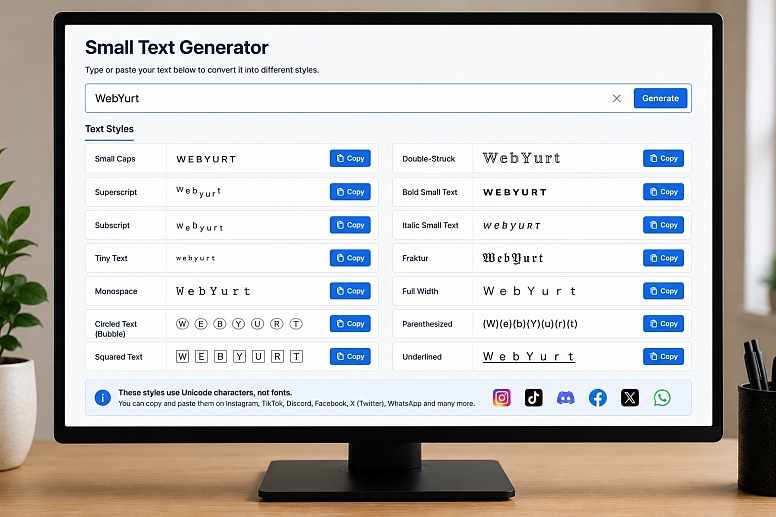
How To Use a Small Text Generator? 3 Simple Steps
What Is a Small Text Generator?
A Small Text Generator converts standard letters into Unicode characters that look smaller than regular text. Although they resemble a different font, they are actually special Unicode symbols that can be copied and pasted into many websites, apps, and social media platforms.
Simply type or paste your text into the generator, and it instantly creates one or more small text styles that you can copy with a single click.
How Does the Small Text Generator Work?
This tool does not install or create fonts on your device. Instead, it replaces standard characters with visually similar Unicode characters. Since Unicode is an international text standard supported by most modern operating systems and browsers, the converted text can usually be pasted directly into compatible applications.
Because the characters are part of Unicode, the text remains editable and searchable in many situations while maintaining its distinctive appearance.
Where Can You Use Small Text?
Small text is popular for making short pieces of content stand out without using images or graphics. Common uses include:
- Instagram bios
- TikTok profiles
- Discord usernames and nicknames
- Facebook posts
- X (Twitter) profiles
- WhatsApp status updates
- YouTube channel descriptions
- Twitch profiles
- Gaming usernames
- Online forums and communities
Most modern platforms support Unicode characters, although individual apps may display certain symbols differently.
Why Use Small Text?
Small text can help draw attention to usernames, headings, short quotes, and profile descriptions. It offers a subtle way to personalise your content while remaining easy to copy and paste.
Many people also use small text to create cleaner-looking social media profiles or to make gaming usernames more distinctive.
How to Use the Small Text Generator
- Enter or paste your text into the input box.
- The generator instantly converts it into small Unicode text.
- Choose your preferred style.
- Click the Copy button.
- Paste it wherever you want to use it.
No registration, downloads, or software installation is required.
Does Small Text Work Everywhere?
Most websites, messaging apps, and social media platforms support Unicode characters, but compatibility can vary depending on the platform, operating system, and font being used.
| Platform | Compatibility |
|---|---|
| Excellent | |
| TikTok | Excellent |
| Discord | Excellent |
| Excellent | |
| Excellent | |
| X (Twitter) | Excellent |
| YouTube | Very Good |
| Microsoft Word | Very Good |
| Email Clients | Generally Good |
Text Styles You Can Create
Our Small Text Generator offers multiple Unicode text styles that you can instantly copy and paste. Each style has its own appearance and is suitable for different uses, from social media profiles to gaming usernames and creative messages.
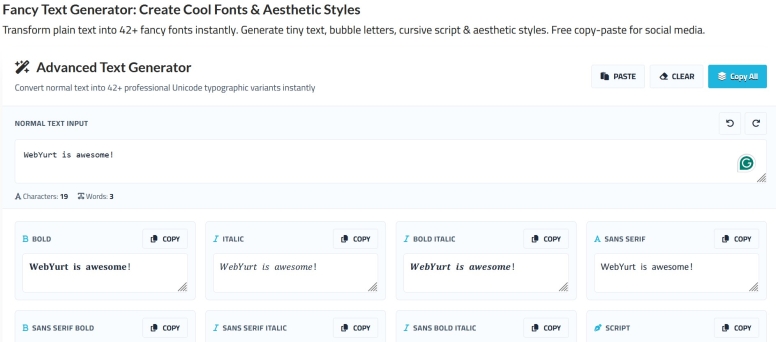
Small Caps
Small caps replace standard lowercase letters with smaller uppercase-style Unicode characters. They're ideal for elegant headings, Instagram bios, usernames, and subtle emphasis.
Example:
WebYurt → ᴡᴇʙʏᴜʀᴛ
Superscript
Superscript places characters above the normal text line. It's commonly used for mathematical notation, footnotes, exponents, decorative usernames, and stylish profile text.
Example:
Hello → ᴴᵉˡˡᵒ
Subscript
Subscript characters appear slightly below the text baseline. They're often used for scientific formulas, chemical symbols, and creative typography.
Example:
Hello → ₕₑₗₗₒ
Tiny Text
Tiny text uses Unicode characters that appear noticeably smaller than standard letters. This style is popular for aesthetic social media bios and decorative messages.
Example:
Hello → ʰᵉˡˡᵒ
Monospace Text
Monospace text gives every character the same width, creating a clean, technical appearance that's often associated with code and terminal windows.
Example:
Hello → 𝙷𝚎𝚕𝚕𝚘
Circled Text
Circled text surrounds each letter or number with a circle, making names, headings, and short phrases stand out.
Example:
Hello → Ⓗⓔⓛⓛⓞ
Squared Text
Squared text places each character inside a square, giving your text a bold and structured appearance that's useful for labels and headings.
Example:
WEB → 🅆🄴🄱
Bubble Text
Bubble text creates a playful rounded appearance that's popular for social media posts, profile names, and decorative captions. Basically the same thing as Circled Text, as it is officially called Circled Latin Letters in Unicode.
Example:
Hello → ⓗⓔⓛⓛⓞ
Double-Struck Text
Double-struck characters have a distinctive outlined appearance inspired by mathematical notation. They're commonly used for decorative usernames and creative text.
Example:
Hello → ℍ𝕖𝕝𝕝𝕠
Bold Small Text
Bold small text combines compact Unicode lettering with a heavier weight, helping important words stand out while keeping a unique appearance.
Example:
Hello → 𝗛𝗲𝗹𝗹𝗼
Italic Small Text
Italic small text adds a slanted style to your words, making quotes, captions, and profile descriptions look more elegant.
Example:
Hello → 𝘏𝘦𝘭𝘭𝘰
Full Width Text
Full width text converts ordinary characters into wider Unicode symbols inspired by East Asian typography. It's frequently used for aesthetic posts and eye-catching headings.
Example:
Hello → Hello
Is This a Font?
No. This generator does not produce fonts. Instead, it converts ordinary letters into Unicode characters that resemble small lettering. Since the characters are built into the Unicode standard, there is no need to install anything before using them.
Can I Use Small Text on Instagram and TikTok?
Yes. Small text is commonly used in Instagram bios, captions, profile names, TikTok profiles, and other social media accounts. Simply generate the text, copy it, and paste it into the desired field.
Keep in mind that some platforms may limit which Unicode characters can be used in usernames while allowing them in profile descriptions or posts.
Tips for Using Small Text
Small text works best when used sparingly. Using it for an entire paragraph can reduce readability, while applying it to short headings, usernames, or important phrases creates a much cleaner effect.
For the best user experience:
- Use it for titles and short phrases.
- Avoid writing long paragraphs entirely in small text.
- Test your text on different devices if appearance is important.
- Combine it with standard text for improved readability.
Frequently Asked Questions
Is this Small Text Generator free?
Yes. You can generate and copy as much small text as you like without paying or creating an account.
Do I need to install anything?
No. Everything runs directly in your browser.
Why do some letters look different?
Unicode does not include a complete small version of every letter. Some characters are substituted with the closest available Unicode equivalent to create a consistent appearance.
Can I use small text on my phone?
Yes. The generator works on most Android phones, iPhones, tablets, laptops, and desktop computers.
Is my text stored?
No. Your text is converted within your browser and is not saved or shared by the generator.
Start Creating Small Text
Whether you're updating a social media profile, creating a unique gaming username, or adding a distinctive touch to your online content, our Small Text Generator makes it quick and easy. Simply enter your text, choose your preferred style, copy it, and paste it wherever you need it.







0.2765