




4 Simple Steps To Build Your Dream Workspace
A professional digital workspace is a configured environment where hardware, ergonomics, surface, and surroundings work together as a performance system, not a décor project. The goal is a setup that supports focused work, clean client calls, fast context switching between tasks, and predictable output quality every single session. Four targeted steps address each layer of that system, from the machine on your desk to the lighting angle behind your camera.
Consider a freelance designer who handles daily client calls from a cramped desk. Mismatched keyboards and redundant cables create a cluttered surface that looks chaotic on video. Rebuilding this foundation requires addressing four specific layers sequentially to protect your creator workflow and eliminate the physical friction that slows down daily deliverables.
1. Choose a Space-Efficient Computer Setup
The hardware problem for most remote professionals involves physical sprawl rather than raw performance. A bulky tower setup paired with a separate display creates visual noise that raises the cognitive cost of shifting between tasks. Tracing thick cords across your desk results in constant micro-interruptions during busy sessions.
An all-in-one computer addresses this footprint issue by reducing the required cables to just a main power line. For budget-conscious professionals who want fewer cables and dependable performance for web work, full retail pricing is rarely necessary.
Choosing a machine like PCLiquidations' certified all-in-one computer provides reliable daily processing power without the premium markup. These compact units effectively handle video calls, admin duties, and standard home office performance needs while reclaiming significant desktop real estate.
Baseline Spec Checklist for Remote Work
Hitting the right metrics ensures your machine can handle multitasking without lagging during crucial client presentations. Use these baseline specifications to evaluate any refurbished or new hardware before integrating it into your workflow.
- Processor: Intel Core i5 (8th gen or newer) or AMD Ryzen 5 equivalent
- RAM: 8GB minimum; 16GB recommended for creative tasks
- Storage: 256GB SSD or larger
- Display: 1080p minimum; integrated or external HD webcam
- Connectivity: Wired Ethernet or Wi-Fi 5/6
- Peripherals: Full-size keyboard, precision mouse, headset with microphone
2. Optimize Your Work Surface for Control
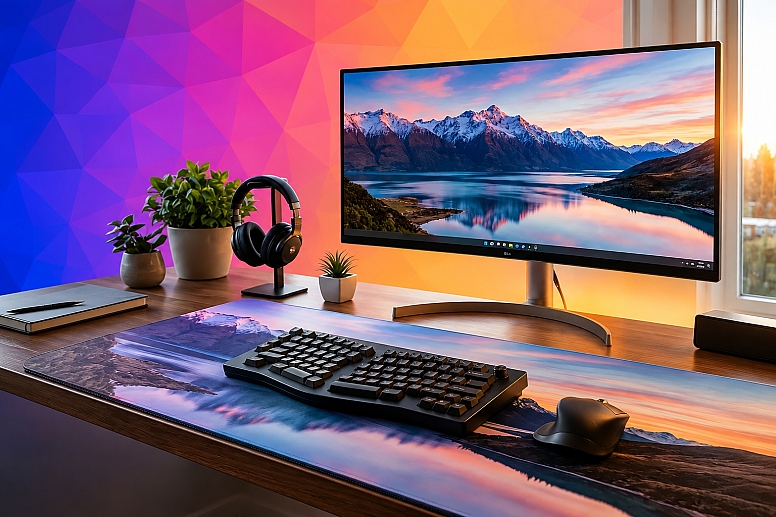
The desk surface functions as the daily operating zone where mouse tracking precision starts and reference materials land. A bare or uneven desk surface introduces inconsistent cursor behavior, creating micro-stutters during precise design work. It also exposes a cluttered background that reads poorly on video during professional consultations.
Resolving these issues requires a unified foundation that anchors the camera frame while supporting physical tasks. A large, dedicated pad like Custom Envy's custom neoprene desk mat creates a consistent, organized work zone that supports smooth mouse tracking and brand-aligned presentation for creators.
This targeted boundary keeps notebooks contained within a specific zone and prevents the hunt-and-grab friction that happens when office supplies scatter across wood or glass. Having a designated landing pad for your phone, pens, and reference documents forces organizational discipline onto the physical space.
|
Key Insight: A single large desk mat solves three problems: inconsistent cursor tracking, hunt-and-grab friction for materials, and a cluttered video background. It defines consistent mousing, creates zones for organization, and anchors a professional camera frame. |
3. Lock In Desk Ergonomics and Input Consistency
Poor ergonomics degrade your physical comfort and measurably slow down your daily output, since 80.81% of office workers report experiencing musculoskeletal disorders in at least one body region. These disorders are significant disruptors, accounting for 32 percent of all cases requiring days away from work in the private sector. Inconsistent input devices create micro-errors during editing cycles because finger travel distances differ across keyboards, forcing your hands to recalibrate constantly.
Set three physical benchmarks once and leave them in place. Place the monitor so the top line of the screen is at or below eye level and at least 20 inches away to reduce focal fatigue. Set your keyboard at elbow height with your forearms roughly parallel to the floor to keep wrist flexion low. Position your precision mouse so your wrist stays flat, which minimizes strain across the tendons running along the back of the hand.
Input consistency functions as a strict workflow discipline rather than a casual comfort preference. Designers and writers who use the same keyboard layout every session train muscle memory that minimizes cognitive friction during revisions. A creator finishing a complex design file makes hundreds of micro-corrections daily. Each keystroke and scroll-wheel adjustment requires slightly less mental energy when your hands know exactly what to expect from the peripheral hardware.
|
Important: Poor ergonomics don’t just cause discomfort; they degrade output. Fatigue from a misaligned monitor measurably slows decision-making during the back half of the workday. Set your monitor, keyboard, and mouse angles once and leave them fixed. |
4. Standardize Your Environment for Repeatable Workflows
A standardized environment removes setup decisions from the start of every workday and every remote meeting. Consistency means your lighting, audio, camera angle, and digital app stack remain identical across all sessions. The time between opening your laptop and being ready to present collapses from several minutes to near zero.
Complete a few standardization actions immediately to establish a permanent baseline. Fix your camera height using a small adhesive mark on the desk or a monitor-mounted clip so the frame never shifts unexpectedly between calls.
Lock a consistent lighting position by sitting near a natural window at a 45-degree angle, or place a key light at a fixed brightness to eliminate harsh shadows. Build a repeatable pre-call checklist that includes verifying your microphone input level, checking your background for stray objects, and closing unrelated browser windows.
Save a default app and tab layout so your productivity systems stay intact between distinct projects. Opening a new client folder in the same screen position as the previous one preserves your digital orientation, allowing you to bypass the manual sorting process entirely. With the environment fully configured before work begins, your cognitive capacity stays focused on the final deliverable rather than the surrounding room.
A professional digital workspace operates as a highly tuned performance system. Its primary job is to reduce physical friction, protect output consistency, and ensure you arrive at every project ready to execute immediately.
Space-efficient all-in-one hardware clears the desk of messy cable overhead, while a customized neoprene surface anchors precise cursor movements and polishes your on-camera presence. Ergonomic alignment protects your physical energy, and a standardized digital layout removes unnecessary setup decisions from your daily schedule.
Evaluate your current remote work setup to identify the specific layer causing the most workflow disruption. Upgrading a failing machine or stabilizing a chaotic desk surface creates a strong foundation for the rest of your tools.







0.335