




Research to Launch: Complete Web Application Design Process
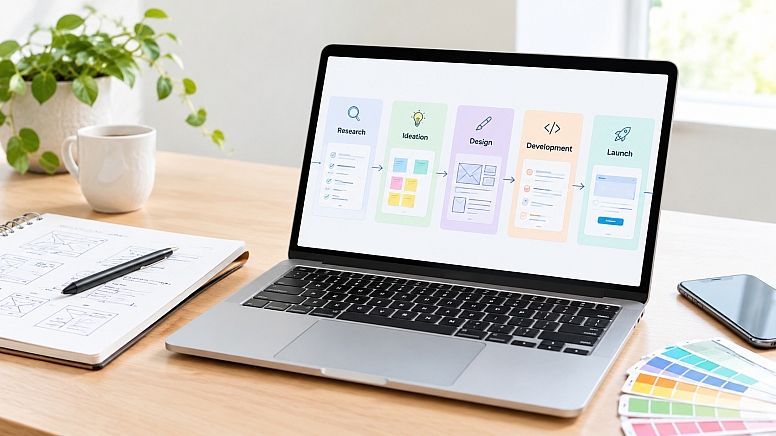
Designing a web application is not the same job as designing a website. A marketing site is mostly about presenting information clearly and guiding visitors toward a conversion. A web app has to account for logic, data, user states, permissions, and workflows that unfold over multiple sessions. Get the process wrong, and you end up with a product that looks fine in a demo but frustrates real users on day two.
We will take you through the full design process for a web application, from early research to what happens after launch. Whether you're a designer, developer, or product owner planning your next build, this is the framework worth following.
Why the Design Process Matters
Skipping research and planning always looks like a shortcut in the moment. It rarely is. Teams that jump straight into UI design without understanding user needs tend to build features nobody asked for, then spend months reworking flows that should have been validated earlier. That rework is expensive, and it's not just a design problem. Poorly planned information architecture creates technical debt too, because developers end up building around assumptions that change every few sprints.
A disciplined process does the opposite. It front-loads the hard questions, which means fewer surprises during development and a product that's actually usable when it ships. Usability isn't a finishing touch you add at the end; it's the outcome of every decision made earlier in the process.
Phase 1: Discovery and Research
Every good web app starts with stakeholder interviews. What business problem is this solving? What does success look like in six months? These conversations align the team before a single wireframe gets drawn.
From there, the focus shifts to the people who'll actually use the product:
- User interviews and surveys to understand goals and pain points
- Competitor analysis to see what's already working (or not) in the space
- Defining user personas and mapping out core use cases
This phase feels slow to teams eager to start building, but it's the foundation everything else rests on.
Phase 2: Information Architecture and UX Strategy
Once you understand who you're designing for, the next step is structure. This means mapping user flows: how someone moves from sign-up to their first meaningful action, and every decision point along the way.
It also means prioritizing what actually goes into the first version. Not every feature idea belongs in an MVP. Ruthless prioritization here saves months of development time later.
Accessibility and responsive behavior should be part of this conversation from the start, not bolted on after the design is "done." Deciding how a data table collapses on mobile, or how a form behaves with a screen reader, is far easier to solve on paper than after the interface is coded.
Phase 3: Wireframing and Prototyping
Wireframes are where structure starts to take visual shape. Low-fidelity wireframes are useful for testing layout and flow quickly, without getting distracted by color or typography. High-fidelity prototypes come later, once the structure is validated, and they're closer to what a real user would interact with.
Tools like Figma, Sketch, and Adobe XD are common choices for this stage, letting teams build clickable prototypes that feel close to a working product.
The real value of prototyping is usability testing before a single line of code is written. Watching a handful of real users try to complete a task in a prototype will surface confusion that internal reviews almost always miss.
Phase 4: Visual and UI Design
With the structure validated, visual design can move faster and with more confidence. This is where design systems and component libraries earn their keep, since reusable buttons, inputs, and cards keep the product visually consistent and speed up both design and development.
A detail teams often underestimate is designing for every state a screen can be in, not just the happy path. Empty states, error messages, loading indicators, and edge cases (what happens when a search returns zero results?) all need thoughtful design, because users will hit them constantly.
Phase 5: Development Handoff and Collaboration
A polished design file means little if it doesn't translate cleanly into code. Good handoff includes detailed specs, documented design tokens, and a style guide developers can reference without constantly pinging the design team.
More important than any document, though, is ongoing collaboration. Teams working in an agile, iterative rhythm, where designers and developers check in regularly rather than handing off once and disappearing, tend to catch inconsistencies early instead of after a sprint is finished.
Phase 6: Testing, QA, and Launch
Before launch, the product needs real usability testing, not just internal QA. Cross-browser and cross-device checks matter here too; a layout that looks perfect in Chrome on a laptop can break in unexpected ways on an older Android browser. Performance checks, like load times and how the app handles slow connections, round out this stage.
Many teams choose a soft launch or beta period, releasing to a smaller group first. This surfaces issues at a manageable scale before the full user base arrives.
Phase 7: Post-Launch: Iteration and Optimization
Launch isn't the finish line. Once real users are in the product, analytics and feedback loops become the primary design tools. Where are people dropping off? What features go unused? These answers shape the next round of improvements.
Web application design is never really "done." The best products keep evolving based on how people actually use them, not just how the team originally imagined they would.
DIY vs. Hiring a Professional Agency
Some teams have the internal bandwidth and skill set to run this entire process in-house, and for smaller or highly specialized products, that can work well. But building a full design practice internally, covering research, IA, prototyping, UI design, and handoff, takes time and dedicated expertise that many teams simply don't have.
That's a big reason many product teams choose to partner with web application design specialists rather than trying to build the entire process in-house from scratch. Agencies like Pixxen bring the process discipline and hands-on experience that comes from running this cycle repeatedly across different products, which often shortens the timeline considerably compared to a team figuring it out for the first time.
Neither path is automatically right. The decision usually comes down to timeline, budget, and whether the team has the specialized skills the process demands at every phase.
Conclusion
A structured design process, from discovery through post-launch iteration, separates web applications that get adopted from those abandoned after a rocky first impression. Each phase builds on the last, and skipping steps to save time upfront almost always costs more later.
Whether you handle this process internally or bring in outside help, from an in-house team to a specialist firm like Pixxen Web Design Agency, the framework stays the same. Start with research, validate structure before visuals, design for every state a user might encounter, and keep listening once the product is live.
FAQs
How long does the web application design process typically take?
It varies by scope, but a mid-sized web app usually takes 8 to 16 weeks from discovery through UI design, before development even begins. Simpler apps can move faster; complex platforms with multiple user roles often take longer.
What's the difference between a wireframe and a prototype?
A wireframe is a low-fidelity layout focused on structure and flow, without color or styling. A prototype is a more interactive, higher-fidelity version that mimics real user interactions, often used for usability testing before development starts.
Do I need a UX researcher, or can a designer handle research too?
Many product designers handle lightweight research, like interviews and competitor analysis, without a dedicated researcher. For larger or more complex products, a specialist can dig deeper into user behavior and validate assumptions more rigorously.
When should I bring in a professional design agency instead of building in-house?
It usually comes down to timeline and expertise. If your team lacks experience running a full design process, or you need to move faster than an internal team can manage, partnering with a specialist agency, such as Pixxen Web Application Design Agency, often shortens the path to launch.






0.3041